
DLT/SDLT Visual Media Inspection Guide
When to perform a visual inspection:
-
Ideally you should inspect the cartridge each time a tape is loaded or changed.
-
When a tape cartridge is dropped or subject to a hard physical shock.
-
When a shipment of tapes shows any sign of shipping damage.
-
If the DLT, DLT VS or SDLT drive becomes inoperable after loading a tape.
If a drive error occurs, inspect the current and previous cartridge used in that drive before using the drive or media again.

How To Inspect a Cartridge:
-
Inspect the case for cracks, chips or signs of damage.
-
Inspect the exterior of the cartridge for chips, cracks, dents, or missing screws. Gently shake the cartridge. Listen for rattling or loose pieces
-
Ensure that the cartridge door is moveable and that the spring is present.
-
Move the write protect switch. It should snap into write-protected mode and write-enabled mode.
-
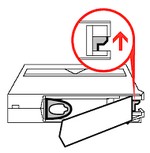
Open the cartridge door and gently inspect the cartridge leader to verify that it has not been damaged and is in the correct position.
-DLT cartridges: Check the height of the leader to ensure that the loop is sticking up approx. 3/16″ or 4mm.
-Super DLT Cartridges: The buckle should not be bent in or out.
When inspecting the cartridge leader do not use anything that could leave contamination, such as a pen or pencil.
-
Check that both reel locks are visible. Verify operation using a small flat blade screwdriver. The reel locks should spring back when released.
-
Confirm the spring-loaded hub on the bottom of the cartridge is centred. Press the hub, it will spring back if operating properly.

Ensure Door operates. DLTtape leader loop should be visable and undamaged.

Check that the Super DLTtape leader buckle aligns with the cartridge edge and metal pin is not bent.

Check reel locks. If not visable, don’t use the cartridge.

Inspect spring-loaded hub for proper tension and centering.
Cartidge Damage Examples:

DLT Cartridge – Leader missing (swallowed cartridge leader or broken tape)

DLT Cartridge – Broken leader loop (not always this obvious)

Media wrapped too loosely (improper tension)

SDLT Cartridge – Bent Media buckle